Door Access Solution

DOOR ACCESS SYSTEM SINGAPORE

Door Access System Solutions in Singapore

Control who can enter selected doors using card, PIN, fingerprint, face recognition or other compatible access methods.

Web Security provides access control solutions for offices, retail, commercial properties and selected residential applications, including new installations and upgrades to existing door access systems.

Since 2003 Office • Retail • Commercial New & Existing Systems
ACCESS CONTROL FLOW

Verify the User Before the Door Unlocks

ACCESS READER Identity Check
Card PIN Fingerprint Face
01
User Presents Credential

Card, PIN, fingerprint or supported face-recognition method.

02
System Checks Access

The controller or access system verifies whether entry is permitted.

03
Door Unlocks

If access is authorised, the connected locking mechanism releases.

Controlled Entry
User Access
Door Release
01 Card Access
02 PIN Access
03 Fingerprint
04 Face Recognition
05 Exit & Emergency Devices
WAYS TO ACCESS

Choose How Users Enter the Door

Door access systems can use different ways to identify authorised users. The suitable method depends on the number of users, security requirement, convenience and how the door will be used day to day.

01
CARD ACCESS

Card or RFID Access

Users tap an authorised card or credential at the reader to request entry. This is commonly used where staff or tenants need a simple physical credential.

SUITABLE FOR Offices • Staff Entry • Commercial Doors
02
PIN ACCESS

PIN Code Access

Users enter an authorised PIN at the keypad. This can be useful where a physical card is not preferred or as an additional verification method.

SUITABLE FOR Small Offices • Staff Areas • Controlled Rooms
03
BIOMETRIC

Fingerprint Access

Fingerprint readers identify authorised users using enrolled biometric data, reducing the need to carry a separate card or remember a PIN.

SUITABLE FOR Staff Access • Offices • Restricted Areas
04
FACE RECOGNITION

Face Recognition Access

Compatible face-recognition terminals can identify enrolled users without requiring them to present a card or physically touch the reader.

SUITABLE FOR Offices • Staff Entry • Higher-Traffic Access
05
MULTI-METHOD

More Than One Access Method

Some access terminals support more than one method, such as card plus PIN, fingerprint plus card, or face recognition with another credential option.

SUITABLE FOR Flexible Access • Different User Groups
WHICH ONE SHOULD YOU CHOOSE?

Match the Access Method to the Door and the Users

SIMPLE Card

Easy to issue and manage for many everyday staff-access applications.

NO CARD PIN

Useful where users should not need to carry a physical credential.

PERSONAL Fingerprint

Links access to an enrolled individual rather than a transferable card.

CONTACTLESS Face Recognition

Suitable where fast, hands-free user identification is preferred.

The access method is only one part of the system. Door type, locking hardware, exit requirements, number of users and system management should also be considered when selecting the setup.
Discuss Access Requirements
HOW A DOOR ACCESS SYSTEM WORKS

From User Verification to Door Release

A door access system checks whether the person requesting entry is authorised, then sends the correct signal to release the connected locking hardware.

01
USER

Present a Credential

The user taps a card, enters a PIN, scans a fingerprint or uses face recognition, depending on the reader and access method.

02
READER

Reader Captures the Access Request

The access reader collects the user credential or biometric input and sends the request into the access-control system.

03
ACCESS CHECK

System Verifies Permission

The controller or access system checks whether that user is allowed to enter the selected door.

04
DOOR

Lock Releases

If access is authorised, the system signals the connected locking hardware to release so the user can open the door.

05
EXIT

User Exits Through the Required Method

Depending on the setup, users may exit using an exit button, compatible sensor, door handle or other configured release method.

ACCESS CONTROL CONNECTION

The Reader Is Only One Part of the System

INPUT Card / PIN / Fingerprint / Face
→
READER Access Terminal
→
CONTROL Controller / Access Logic
→
OUTPUT Electric Lock / Door Release
01 Door Reader

Accepts the selected access credential from the user.

02 Controller

Handles the access decision depending on the system design.

03 Locking Hardware

Releases when the system grants authorised access.

04 Exit Device

Allows users to leave through the configured exit method.

A door access system needs more than just a reader. Reader compatibility, locking hardware, exit requirements, door type, cabling and system configuration should all be considered as one setup.
Plan a Door Access System
WHERE DOOR ACCESS SYSTEMS ARE USED

Control Entry to the Areas That Matter

Door access control can be used for a single entrance, selected rooms or multiple doors across the same premises. The setup depends on who should enter, which areas need control and how access should be managed.

01
OFFICE

Main Office & Staff Entrance

Control staff entry at the main office door instead of relying only on a conventional key. Different authorised users can be enrolled into the access system depending on the selected reader.

COMMON REQUIREMENT Staff-only entry with easier user management
02
INTERNAL AREA

Restricted Rooms

Access control can be installed on selected rooms where entry should be limited to specific staff, departments or authorised personnel.

COMMON REQUIREMENT Server room • Store room • Management room
03
RETAIL

Staff-Only & Back-of-House Areas

Retail premises may use door access control to separate public areas from staff-only rooms, stock areas or internal operational spaces.

COMMON REQUIREMENT Store room • Office • Stock area
04
COMMERCIAL

Shared Commercial Entrances

Selected commercial premises can use access control at common entrances where entry should be limited to approved users rather than left open throughout the day.

COMMON REQUIREMENT Controlled entry for authorised users
05
CLINIC / SERVICE

Staff & Controlled Work Areas

Clinics and service businesses may use access control for rooms that should remain restricted from general public access.

COMMON REQUIREMENT Staff room • Admin area • Controlled room
06
RESIDENTIAL

Selected Residential Entrances

Depending on the door and property setup, access control may also be considered for selected landed-property entrances or internal access points.

COMMON REQUIREMENT Gate • Entrance • Selected internal door
ONE SITE, DIFFERENT ACCESS LEVELS

Not Every Door Needs the Same Access Rule

A premises can have different access requirements for different areas. The main entrance may be available to all staff, while selected rooms are limited to only specific authorised users.

AREA A General Staff
→
AREA B Selected Staff
→
AREA C Restricted Access
01 Number of Doors

Decide whether access control is needed on one door or multiple entry points.

02 Number of Users

The setup should match the number and type of authorised users.

03 Door Type

The physical door and locking arrangement affect the access-control setup.

04 Access Level

Different rooms may require different groups of authorised users.

Start with the doors and users, then choose the access method. The right setup depends on which areas need control, who needs access and how each door should operate during normal use and exit.
Discuss Your Access Areas
DOOR ACCESS + CCTV + VIDEO INTERCOM

Combine Entry Control with Monitoring and Visitor Communication

Door access, CCTV and video intercom can support different parts of the same security process: who is requesting entry, whether access should be allowed, and what is happening around the entrance.

01
DOOR ACCESS

Control Entry

Access control decides whether an authorised user can unlock a selected door.

02
CCTV

Monitor the Entrance

CCTV provides visual monitoring around the entrance, doorway or surrounding area.

03
VIDEO INTERCOM

Communicate with Visitors

A video intercom can allow staff or occupants to see and speak with visitors before entry.

EXAMPLE ENTRY WORKFLOW

Different Systems Can Support the Same Door

VISITOR ARRIVES Entrance
→
COMMUNICATE Video Intercom
→
MONITOR CCTV Camera
→
AUTHORISE Door Access / Release
STAFF ENTRY

Authorised Staff Access

Staff may enter using an enrolled card, PIN, fingerprint or face-recognition method while CCTV monitors the surrounding entrance area.

VISITOR ENTRY

Visitor Verification

Visitors may use an intercom to contact staff before the door is released, while CCTV provides additional visual monitoring where required.

These systems do not always need to be directly integrated. Door access, CCTV and intercom can operate as separate systems while still supporting the same entrance. Direct integration depends on the selected equipment and system compatibility.
NEW INSTALLATION OR EXISTING SYSTEM UPGRADE

Install a New System or Improve What Is Already There

Not every door access project starts from zero. Existing readers, cabling, locks and controllers can be reviewed first to see what may still be usable and what should be upgraded.

PATH 01

New Door Access Installation

Suitable for new offices, renovations, new entrances or doors that currently do not have an access-control system.

01 Check Door Type
02 Select Reader & Access Method
03 Plan Locking & Exit Hardware
04 Run Required Cabling
05 Configure Users & Test Access
PATH 02

Existing Door Access Upgrade

Suitable when the current system still works but is outdated, unreliable, difficult to manage or missing newer access methods.

01 Review Existing Reader & Controller
02 Check Lock & Exit Devices
03 Inspect Cabling & Power
04 Identify Reusable Components
05 Replace Only What Is Needed
EXISTING SYSTEM REVIEW

Keep, Review or Replace?

KEEP Usable Components

Existing cabling, locks or other components may be retained if they remain suitable and compatible with the required setup.

REVIEW Older Equipment

Readers, controllers or power equipment may need checking before deciding whether they should remain in the system.

REPLACE Faulty or Incompatible Parts

Unreliable, damaged or incompatible components may need to be replaced to support the required access-control setup.

01 Old Card Reader

Upgrade to a reader that supports the access method required today.

02 Difficult User Management

Older setups may make adding, removing or managing users more troublesome.

03 Intermittent Door Release

Reader, controller, lock, power or cabling should be checked before replacement.

04 New Access Method Needed

Existing card-only systems may be reviewed for fingerprint, PIN or face-recognition options.

CURRENT SYSTEM Existing Door Access
→
REVIEW Reader • Lock • Cabling • Controller
→
DECISION Keep • Upgrade • Replace
→
RESULT Updated Access System
Replacing everything is not always necessary. Existing door access components can be reviewed first so the upgrade focuses on the parts that actually need improvement.
Review Existing Door Access
DOOR HARDWARE & EXIT COMPONENTS

The Reader Is Only One Part of the Door Access Setup

A complete access-control installation also depends on the physical door, locking hardware, exit method, emergency release components and the way everything is connected together.

01
ENTRY

Access Reader

The reader accepts the selected access method, such as card, PIN, fingerprint or face recognition, depending on the model used.

ROLE Verify the user
02
LOCKING

Electric Lock

The locking hardware controls whether the door remains secured or releases after an authorised access request.

ROLE Secure or release the door
03
EXIT

Exit Button

An exit button can be used on the inside of the premises to trigger door release for normal exit, depending on the access setup.

ROLE Request door release from inside
04
EMERGENCY

Emergency Break Glass

Depending on the door and system design, an emergency release device may be included as part of the door-access arrangement.

ROLE Emergency release function
05
CONTROL

Controller & Power Equipment

Depending on the system design, control and power equipment may be required to manage reader input, door release and connected devices.

ROLE Manage the system logic
COMPLETE DOOR ACCESS PATH

Entry, Locking and Exit Work Together

OUTSIDE Access Reader
→
CONTROL Controller / System
→
DOOR Electric Lock
↔
INSIDE Exit / Emergency Release
DOOR TYPE MATTERS

Hardware Selection Depends on the Actual Door

Glass doors, wooden doors, metal doors and gates may require different mounting, locking and cabling arrangements. The physical door should be checked before finalising the access-control hardware.

+ Door material
+ Door opening direction
+ Existing lock or closer
+ Reader mounting position
+ Exit arrangement
+ Cabling route
Emergency break glass and exit button for door access control system
REAL INSTALLATION COMPONENTS

Exit Button & Emergency Release

These components may form part of the inside-door arrangement depending on the access-control design and door requirements.

The exact combination should be selected together with the reader, locking hardware and overall door setup rather than as separate items.

Choose the reader and door hardware as one system. A suitable access reader is only useful when the lock, exit method, cabling and physical door arrangement also work correctly together.
Check Your Door Setup
DOOR ACCESS CONTROL PRODUCTS

Door Access Control Readers & Devices

Browse selected door access control models for card, PIN, fingerprint and face recognition applications. The suitable model depends on the entry method, door type, number of users and required system features.

REAL DOOR ACCESS INSTALLATION WORK

Real Access Control Installations & Configuration

Door access systems need both suitable hardware and proper on-site setup. These examples show real reader installations, access configuration and completed door access work by Web Security.

Face recognition door access system installed at a small office
FACE RECOGNITION ACCESS

Office Door Access Installation

Face recognition access can provide a convenient hands-free entry method for authorised staff where the selected system supports it.

Fingerprint door access reader installed at an entrance
FINGERPRINT ACCESS

Biometric Entry Reader

Fingerprint readers can be used where authorised users should access the door using enrolled biometric credentials.

Door access system configuration performed on site
ON-SITE CONFIGURATION

Access System Setup & Testing

Reader installation is followed by configuration and testing to confirm that authorised access and door release work as expected.
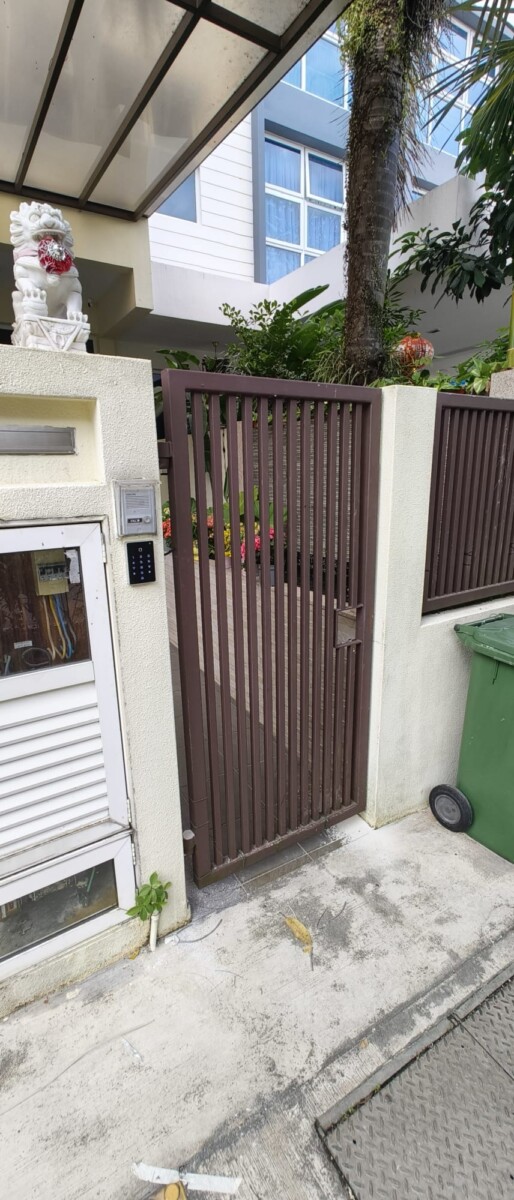
Door access system installed at the exterior entrance of a landed property
RESIDENTIAL ACCESS

Landed Property Entrance

Selected residential entrances may also use access-control solutions depending on the gate, door and overall property setup.

01 Reader Installation

Reader position and mounting should suit the actual entrance and door.

02 Lock Integration

The access system must work correctly with the selected locking hardware.

03 System Configuration

Users and access methods need to be configured according to the site requirements.

04 Testing & Handover

Entry and exit operation should be checked before the system is handed over.

The right door access setup depends on the actual site. Reader type, lock, door construction, user requirements and exit arrangement should all be considered before finalising the system.
Discuss Your Door Access Project
DOOR ACCESS FAQ

Common Questions About Door Access Systems

The right door access setup depends on the door, number of users, access method, locking hardware and whether the site already has an existing system.

Already have an existing door access system? We can review the reader, lock, cabling and other components first before deciding what should be kept, upgraded or replaced.

Door access systems may support card, PIN, fingerprint, face recognition or a combination of access methods, depending on the selected reader and system.

It depends on how many users need access, the level of convenience required, the type of entrance and how you want users to identify themselves.

Existing systems can be reviewed to see whether the current lock, cabling, controller or other components can still be used with an upgraded reader or access-control setup.

Not necessarily. The reader, controller, locking hardware, power and cabling can be checked first to identify which part is actually causing the problem.

Yes, both systems can support the same entrance. CCTV can provide visual monitoring while the door access system controls authorised entry. Direct system integration depends on the selected equipment.

Yes. A video intercom can be used for visitor communication while door access controls entry for authorised users. Depending on the equipment, the systems may operate separately or support compatible integration.

Exit arrangements depend on the door and system design. An exit button, compatible sensor, door handle or other configured release method may be used.

The required emergency release arrangement depends on the door, locking method, site requirements and overall access-control design. The door setup should be reviewed before selecting the components.

Different door types may support access control, but the reader mounting, lock, brackets, cabling and exit arrangement need to suit the actual door.

Depending on the access-control system selected, multiple doors may be managed as part of the same setup. The number of doors, users and required access levels should be considered during planning.

DOOR ACCESS ENQUIRY

Tell Us About the Door You Want to Control

Need a new access-control system, a reader upgrade, a replacement for an existing setup or help checking a door that is not working properly?

Share the door type, preferred access method and whether there is already an existing lock, reader, controller or cabling in place.

01

What Type of Door?

Glass, wooden, metal, gate or another entrance type.

02

Which Access Method?

Card, PIN, fingerprint, face recognition or a combination.

03

New or Existing System?

Let us know whether this is a fresh installation, upgrade, replacement or troubleshooting request.

HELPFUL TO SEND Photos of the door, existing reader, lock, exit button, break glass, controller or nearby cabling can help us understand the setup faster.
Web Security Operated by WIT Enterprises Pte Ltd Security system solutions in Singapore since 2003

    Scroll to Top